Stone's Store
Dash Cam 4K UHD Recording Car Camera DVR Night Vision Video Recorder Built-In Wi-Fi Support GPS 24H Parking
Dash Cam 4K UHD Recording Car Camera DVR Night Vision Video Recorder Built-In Wi-Fi Support GPS 24H Parking
Couldn't load pickup availability
Dash Cam 4K UHD – Dual Lens Car Camera with Night Vision, Wi‑Fi, GPS & 24H Parking Guard
Capture every moment on the road in stunning 4K clarity and drive with total peace of mind. This smart dash cam system is designed for drivers who want crystal‑clear evidence, effortless app control, and reliable protection for their car – even when it’s parked. From daily commutes to long road trips, it quietly records your journey so you can focus on the drive.
🌟 Why You’ll Love It
- Ultra‑sharp 4K front recording – Record the road ahead at 3840x2160@25FPS for clear license plates, road signs, and crucial details in any situation.
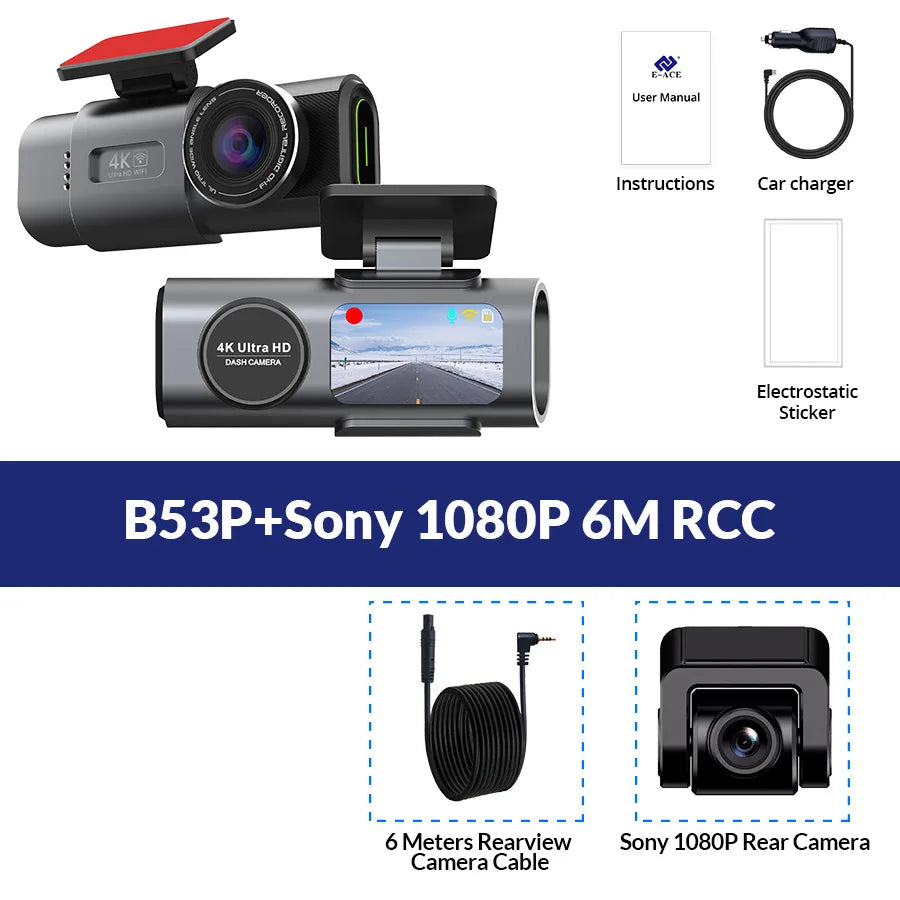
- Dual‑lens protection front & rear – Optional 1080P Sony night vision rear camera covers what’s behind (or inside) your car, ideal for parking, reversing, and rideshare drivers.
- Super night vision for safer night drives – Sony IMX415 sensor, F1.6 large aperture, and 6‑glass lens capture brighter, clearer footage in low light and at night.
- Built‑in Wi‑Fi & app control – Connect via the “Viidure” app to view live video, download clips, take photos, and adjust settings directly from your phone.
- GPS route & speed tracking – With the GPS module, your videos are matched with speed and route data so you can review your journeys on your computer.
- 24H parking monitoring (with hardwire kit) – Keep watch over your car even when the engine is off. Perfect for street parking, garages, and long stays.
- Wide‑angle coverage – 170° front and 140° rear viewing angles reduce blind spots and give you a fuller picture of what’s happening around your vehicle.
- Flexible rear camera placement – Mount on the rear windshield to monitor traffic behind you, or on the front windshield to record the cabin.
- Portable, easy installation – Simple to mount and power using the included car charger or optional hardwire kit without blocking your view.
- Multi‑language support – On‑screen and app languages include English, Russian, French, Spanish, German, and more for a smoother user experience.
⚙️ Full Specs
Special Note:
Prohibit the use of data cable to connect the machine to boot, it will lead to insufficient voltage on the machine motherboard to repeat the boot or can not start, easy to make the machine damaged!
Since electronic products have strict voltage requirements, please use our standard car charger for power supply. If we do not configure the charger, the machine may not work normally. Please use our products correctly to avoid damage to the machine caused by improper operation.
Please ask the customer to carefully review the accessories included in the package main image before placing an order based on their needs. Please refer to the main images of each package for accuracy. (The items included in the SKU package are subject to the package pictures)
About Carplay/Android Auto Connection:
(1) If it is an Apple phone, the DVR menu needs to select the Carplay connection method as the connection method. The Carplay software installed on the Apple phone can directly connect to the DVR through the Carplay function.
(2) If it is an Android phone, the DVR menu needs to select Android Auto as the connection method, and then download the Android Auto software from the Google App Store to connect to the DVR (Note: You must make sure to download the "Android Auto" software from the Google App Store. Downloading it from other channels may not work.)
About WIFI Connection:
Before connecting to the DVR on the phone, it is necessary to install the WIFI connection app "Viidure" in advance. You can search for "Viidure" installation in the Apple App Store or Google App Market.
Steps:
(1) Enter the DVR menu and enter the WIFl setting menu, nable WiFi function;
(2) In the wifi menu of the DVR, check to obtain the wifi SSID name and password;
(3) Open the "Viidure" APP on your phone, enter the configuration mode, turn on the wifi function of the phone, follow the prompts to find the SSID wifi signal of the DVR and enter the password to connect;
(4) After successful configuration, you can connect and operate the DVR through the "Viidure" APP.
Features And Specifications
| Model Number | B53P |
| Installation Type | Portable Recorder |
| Chipset | Novatek 96670 |
| Imaging sensor | Sony IMX415 |
| Camera Lens | Front + Rear; 6 Glass + 4 Glass ; 170 Degree Angle + 140 Degree ; F1.6 Aperture + F2.0 Aperture |
| Video Resolution | Front: 3840x2160@25FPS; Rear: 1920*1080P@25FPS |
| OSD Languages | English, Russian, Dutch, French, Spanish, Portuguese, German, Italian, Chinese, Japanese, Korean, Polish, Thai, Vietnamese,tc..... (You can change the desired language on the app) |
| Memory Card | Micro SD Card, Class 10 and 16GB to 128GB (Not included) |
| Add Features | Support Night Vision, Wifi,GPS |
Packing List
| 1 x Packaging box |